Occasionally, we may receive an alert such as the one below:
From: servicesalert@fiserv.com <servicesalert@fiserv.com>
To: misalerts@ffl.net
Subject: Lack of Check-in over the past 24 hours
The Cleartouch Service(s) listed below are no longer communicating with
Fiserv. When a Cleartouch Service is not functioning, the accuracy of your
Cash Tracking reports may be affected, along with your ability to search
for prior dates in your Teller Journals.
----------------------------------------------------------------------
Service Name: CTSERVICE_BRANCH005
Machine Name: FFL-OT-CT
Last Check-In: 2/7/2022 7:19:07 PM
----------------------------------------------------------------------
Follow the steps at the bottom of the alert email to restart the CT service and resume check-ins to Fiserv.
Rarely, these steps may not work and you may encounter the following error message when trying to start the service, even after rebooting the CT server:
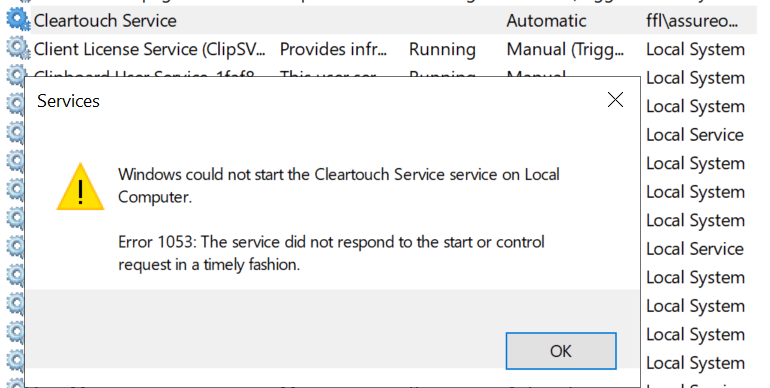
Per Fiserv, to fix this: Go to C:\Cleartouch3\Service, locate the Deploymentserviceserivceitem.xml file and delete or rename it to "old" or "bad."
Launch the Cleartouch Service icon on the desktop and register it. Once open and the service started, complete a "Check In Now" from the Distribution Service menu.
Once completed, you will not see any confirmation on your end. However, Fiserv can confirm that the service has checked in and then remove the old instance of the CT service, as doing this creates a new instance under the same branch name.
Fiserv confirms that doing this process during business hours is safe, as the CT service only checks in with Fiserv after hours (9:00 pm Eastern or later). The branch only processes data through the SQL services on the server, so the CT service adjustments will have no impact on their ability to work.
Was this article helpful?
That’s Great!
Thank you for your feedback
Sorry! We couldn't be helpful
Thank you for your feedback
Feedback sent
We appreciate your effort and will try to fix the article